

Looking for practical ways to refresh your resume? You’re in the right place.
In this blog, we’ll explain why and how often you should update your resume, followed by 5 tips on how to improve your current resume and impress employers.
Why You Need To Update Your Resume

On average, a hiring manager (or talent acquisition team member) spends just six seconds reviewing a resume before deciding whether to move it to the interview pile. That’s a very small window of opportunity to make a good first impression, and it’s important to make it count.
A polished, up-to-date resume tells employers that you’re serious about your job search and that you have the skills and experience they’re looking for. It also:
- Puts your most recent, high-value achievements and skills front and center
- Shows you’re continuously growing, upskilling, and evolving
- Means you’re prepared for a sudden, life-changing career opportunity
By treating your resume as a living document rather than a historical archive, you give yourself a competitive edge and a reason why employers should choose you over other candidates!
How Often You Should Make Edits
Do you remember what you ate for breakfast yesterday? Probably not. So odds are, you won’t remember the exact metrics, scope, or revenue impact from a project you completed a year ago, either.
To avoid forgotten but important details, you should update your resume after key career milestones and successes, such as wrapping up a big initiative, learning a new tool, or earning a certification. So, what does that mean in terms of time? Well, it depends.
A good rule of thumb: Aim to refresh your resume every six months. It is much easier to log your wins in real time than to do it from memory. Plus, you can always remove information later if it’s no longer relevant to your career goals.
5 Tips for Updating Your Resume
1. Highlight What You Made, Saved, and Achieved
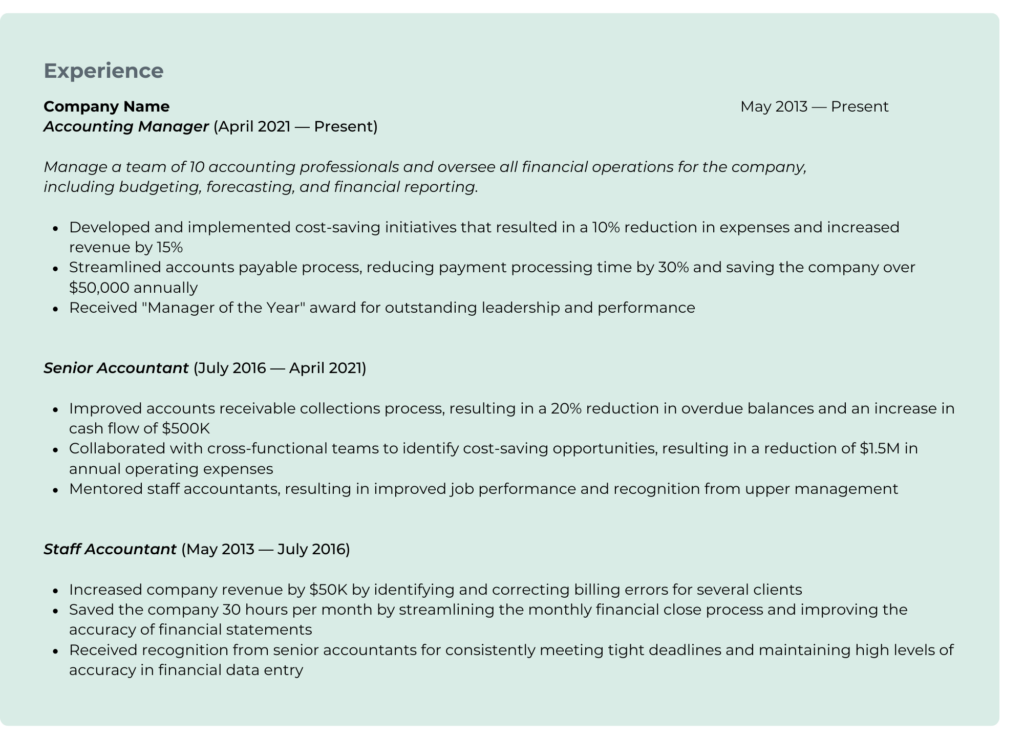
Hiring managers don’t want to see a list of your daily job responsibilities. What they want to know is the tangible value you’ll add to the team.
Showcase your skills and accomplishments to potential employers, and include specific examples of how you’ve made and saved money for prior employers and personal awards or recognition you’ve achieved.
When updating your work history, move away from passive phrases like “Responsible for…” and focus more on outcomes and data points. Make sure to include specific examples of how you’ve made and saved money for prior employers, as well as any personal awards and achievements you’ve earned.
Here’s an example of the experience section for an accounting professional:
2. Add Your New Skills and Certifications
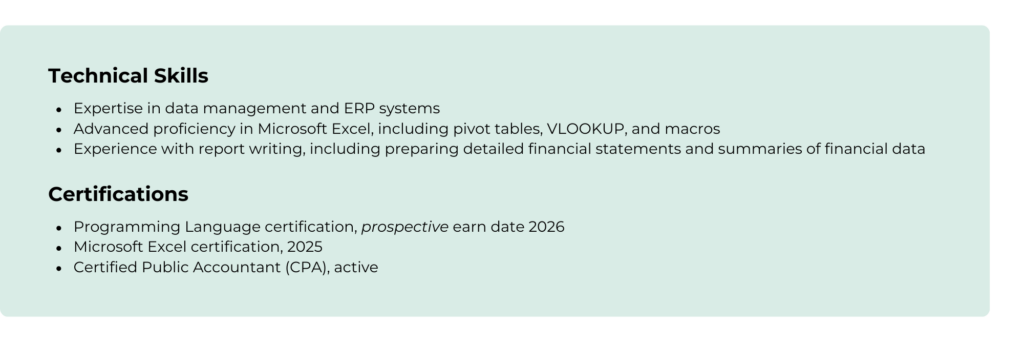
What skills have you learned or improved upon since you last updated your resume? Have you completed a course, earned a new credential, or started working toward one?
Add these details to the skills or certifications section of your resume. Many employers appreciate seeing this information as it demonstrates your commitment to learning and growth, making you a more desirable applicant.
A quick word on honesty: Always be honest about your actual level of expertise. It’s never a good idea to lie or exaggerate on your resume. Employers may test your proficiency in certain areas during the interview process.
Here’s an example of the skills and certifications section:
3. Keep It Concise and Easy To Read
Hiring managers don’t want to read lengthy, text-heavy paragraphs. To make a good impression during that 6-second look, your resume needs to be highly scannable. Keep your bullet points short and sweet, starting each one with a strong action verb.
When it comes to formatting, less is almost always more. Avoid flashy colors, complex graphics, or odd layouts that confuse automated resume scanners.
3 quick design standards to follow:
- Choose a clean, professional font that is easy to read, like Arial (NO Comic Sans)
- Keep body text between 10pt and 12pt
- Make sure there’s enough white space throughout so it doesn’t look or feel cluttered
Lastly, remove any internal company acronyms or terminology. You may think your terms are commonly understood, but they may not be. Do your best to translate them into a language that’s more industry-standard.
4. Tailor Your Resume to the Job You’re Applying For
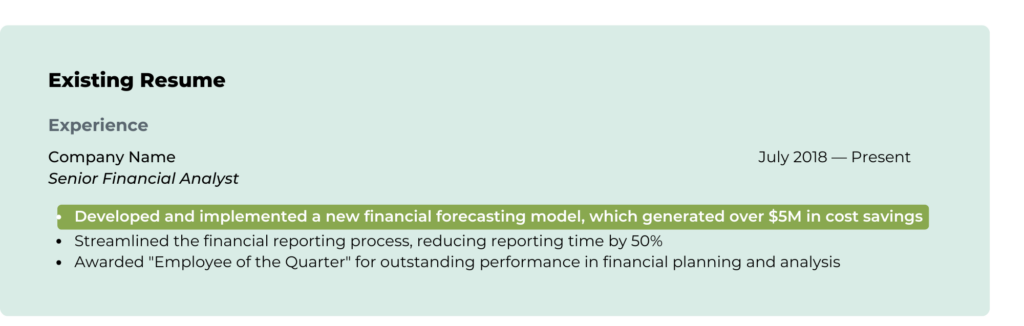
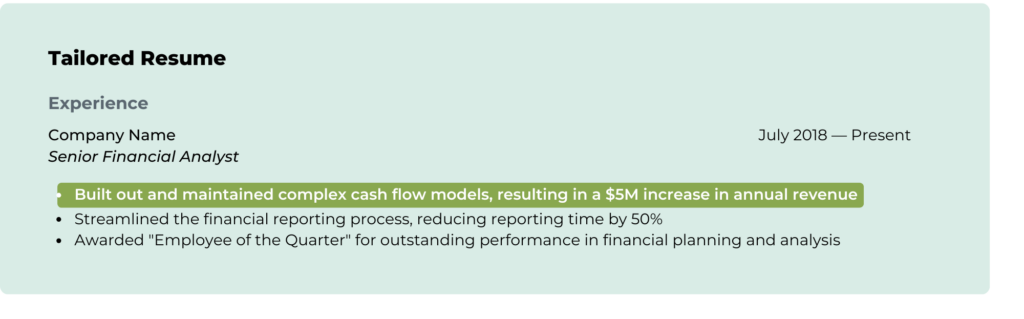
When submitting job applications, a generic, one-size-fits-all approach rarely works. Tailoring your resume to the specific role you’re applying to shows the employer that you are the exact solution to their current problem.
Fortunately, you don’t need to rewrite your resume from scratch every time. Instead, carefully review the job description and adjust your existing wording to mirror the keywords and essential duties listed in the description.
Here’s an example of an edit you could make if the job requires building out cash flow models:
5. Proofread, Proofread, Proofread
Your resume is a direct reflection of your professionalism and work ethic.
- Typos and grammatical errors signal a lack of attention to detail
- Messy formatting suggests an inability to present and organize information
Before you submit your application, proofread your resume at least twice. Then once more, to be safe. This is especially critical if the role you’re applying to involves data entry, reporting, or financial accuracy.
|
A Quick Note on Using AI:
|
Related Resources
- When To Leave Public Accounting and What To Look For
- 10 Interview Tips to Land Your Dream Job
- 12 Reasons to Connect with a Recruiter